
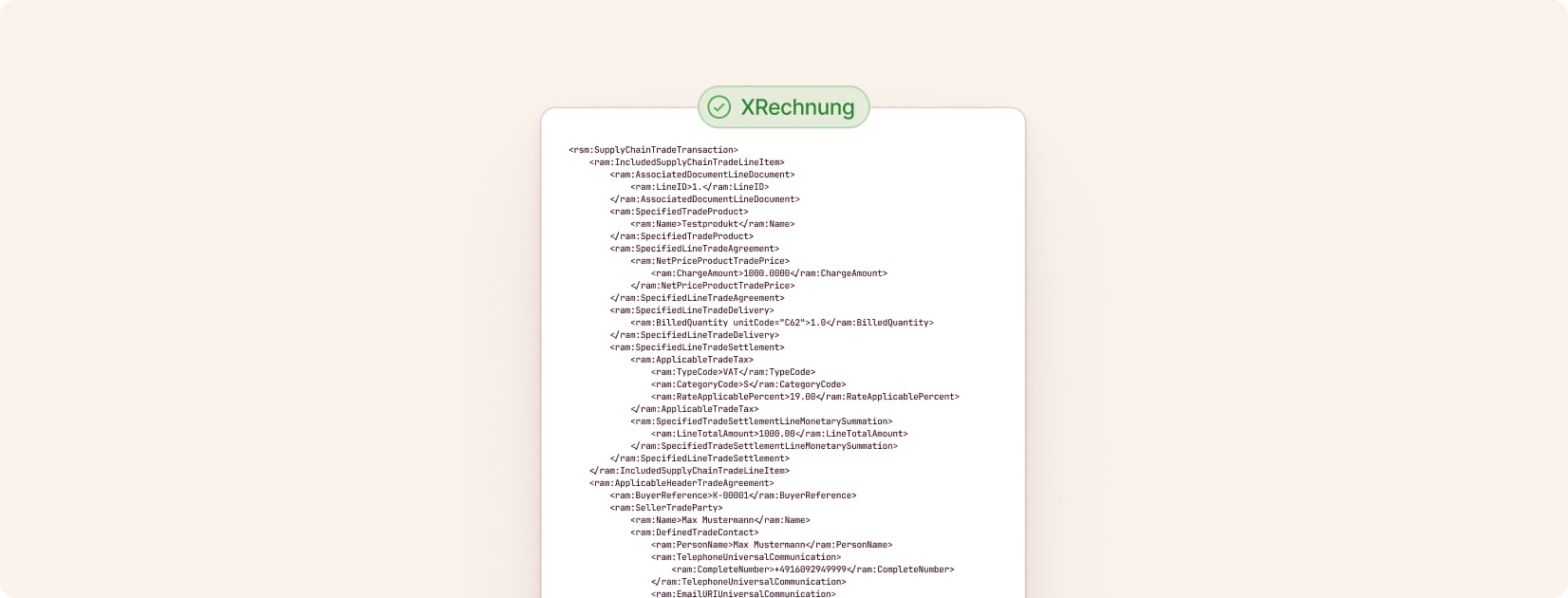
Create XRechnung invoices for free (2026)
XRechnung is a standardized format for e-invoices in Germany. It is mainly required by public authorities and public-sector clients.
You can create an XRechnung in the browser or use Cakedesk to create a regular invoice and export it as an XRechnung XML file.
#Option 1: Create an XRechnung online
If you need a quick single XRechnung, use the free online invoice generator. Enable Generate E-Invoice (1), fill in the client, invoice, and line item details, then download the XRechnung XML (2).
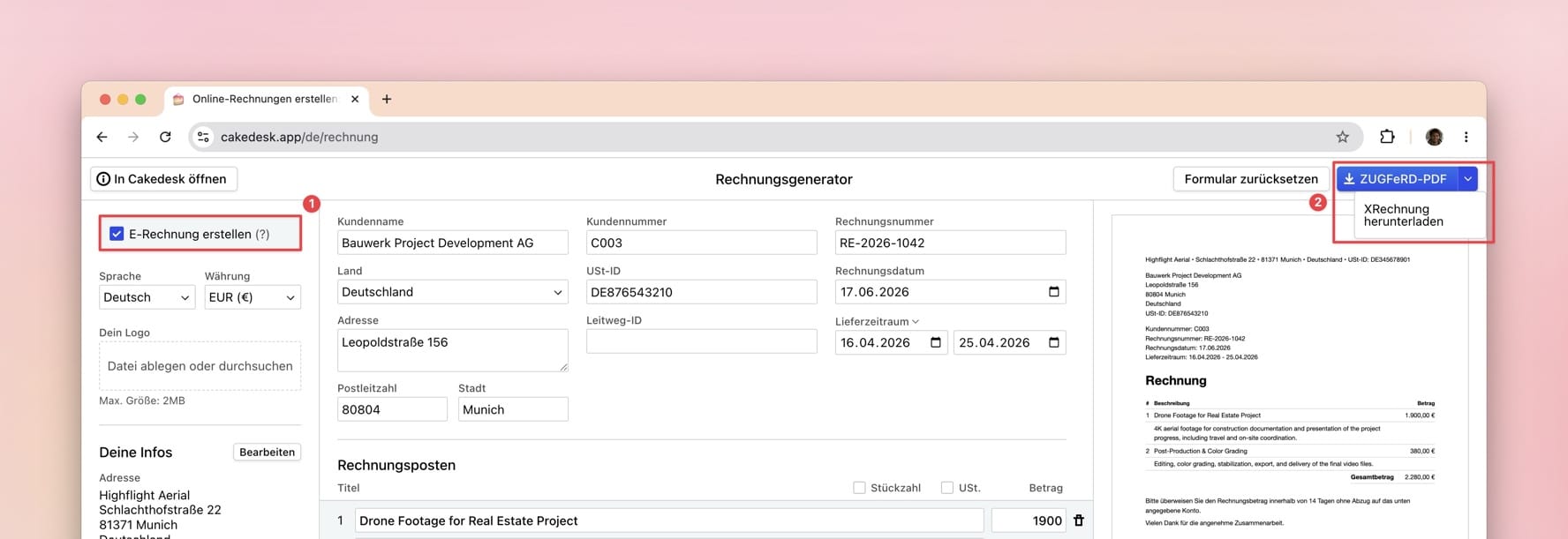
The browser option is useful when you want to start without installing anything or only need to create XRechnung invoices occasionally.
#Option 2: Create XRechnung invoices with Cakedesk
If you plan to create invoices or XRechnung files regularly, Cakedesk, an invoice app for Windows and Mac, is the better choice.
#1. Set up your e-invoice settings
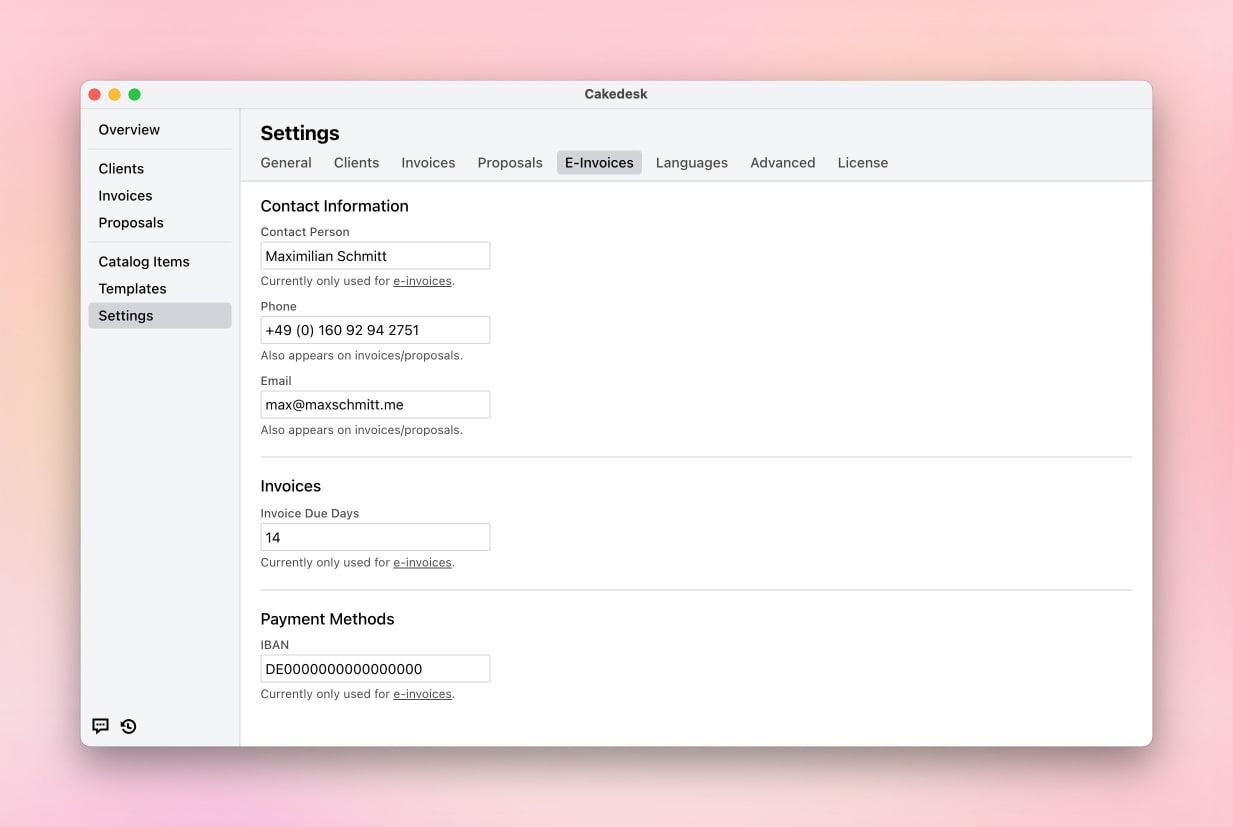
Before creating your first XRechnung, configure your e-invoice settings under Settings > E-Invoices:
- Contact person name: Your name or your company's contact person
- Phone and email: Contact details that appear in the e-invoice data
- Invoice due days: Default payment term, such as 14 or 30 days
- Bank details: Account holder, IBAN, and BIC for payment information
#2. Enable e-invoices for your client
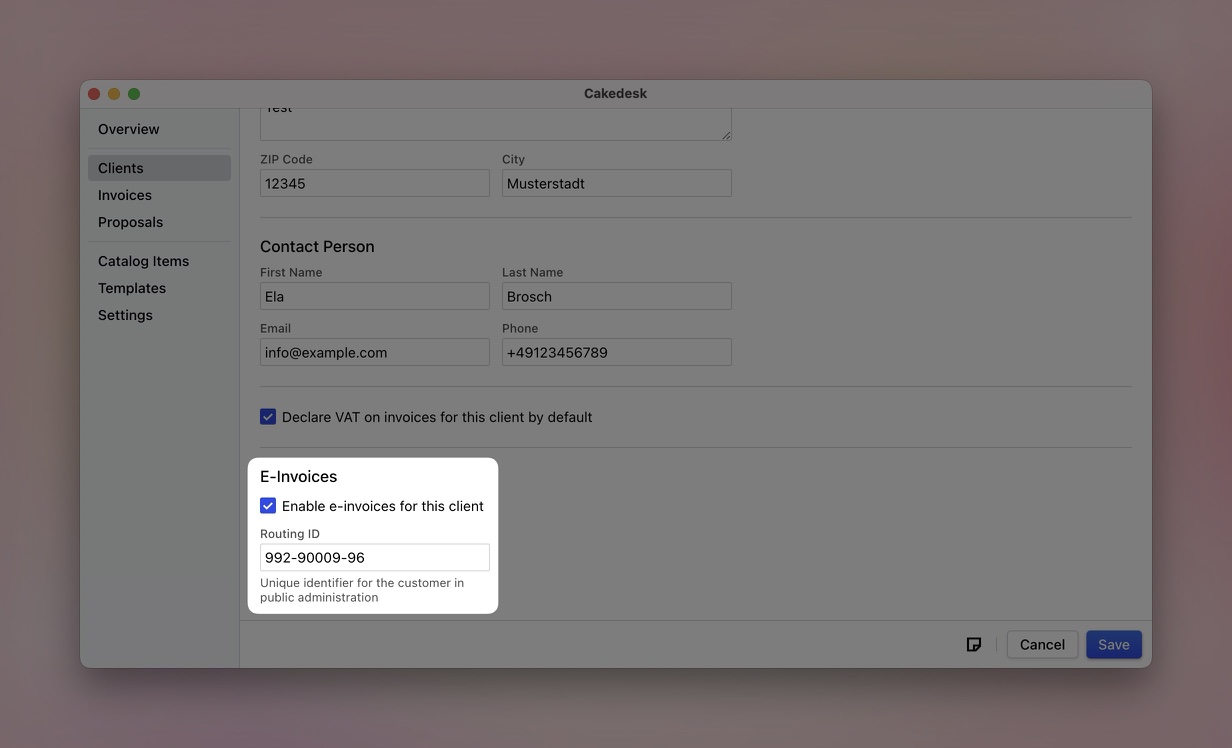
Open the client you want to invoice and enable e-invoicing:
- Open the client details
- Scroll to the "E-Invoices" section
- Check "Enable e-invoices for this client"
- Enter the routing ID if your client provided one
#3. Create the invoice
Create an invoice for this client as usual. When e-invoices are enabled for the client, pay special attention to these fields:
- The delivery date field is required
- Line items should contain net prices, quantities, units, and correct tax rates
- Public-sector clients may require references such as purchase order or contract numbers
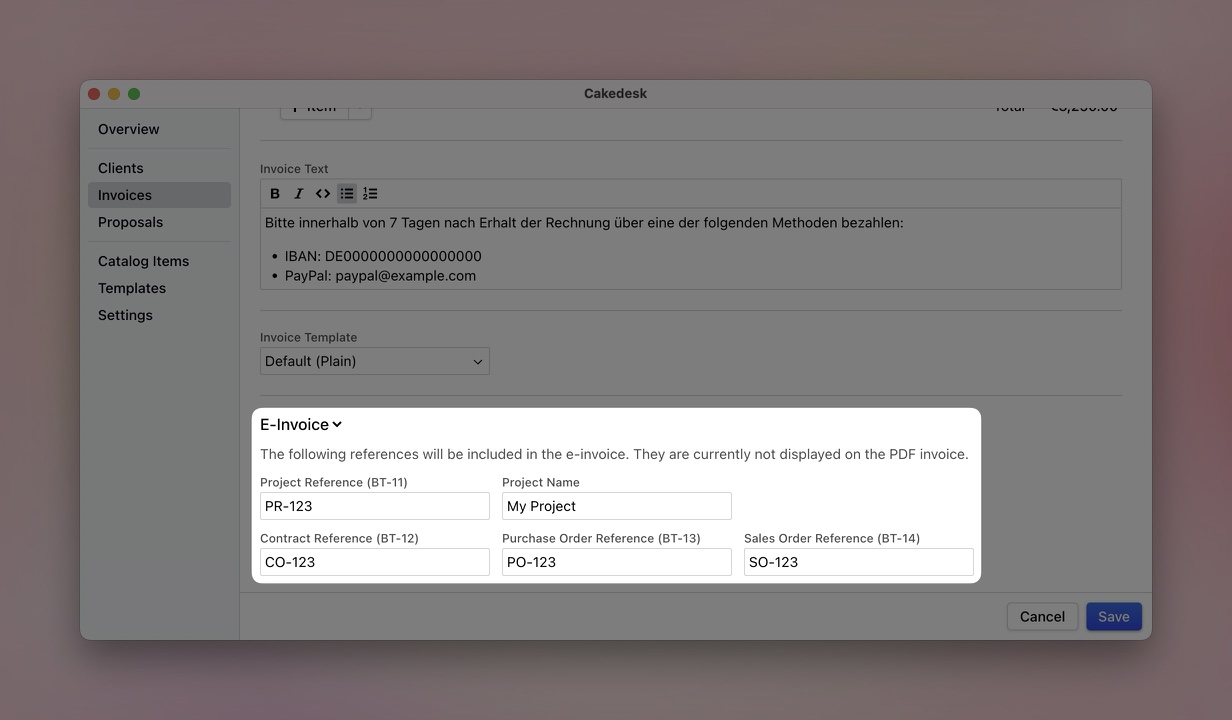
For more complex invoicing scenarios, you can add reference fields:
- Project reference (BT-11): Link the invoice to a specific project
- Contract reference (BT-12): Reference an underlying contract
- Buyer purchase order reference (BT-13): Your client's purchase order number
- Sales order reference (BT-14): Your own order number
These fields are included in the XRechnung data but do not appear on the visible PDF.
#4. Export the XRechnung
After saving your invoice, right-click it to access the export options. For XRechnung, choose Export XRechnung.
You can still export the invoice as a PDF as well:
- Open PDF (E-Invoice): Opens a ZUGFeRD PDF with embedded XML data
- Export PDF (E-Invoice): Saves a ZUGFeRD PDF to your computer
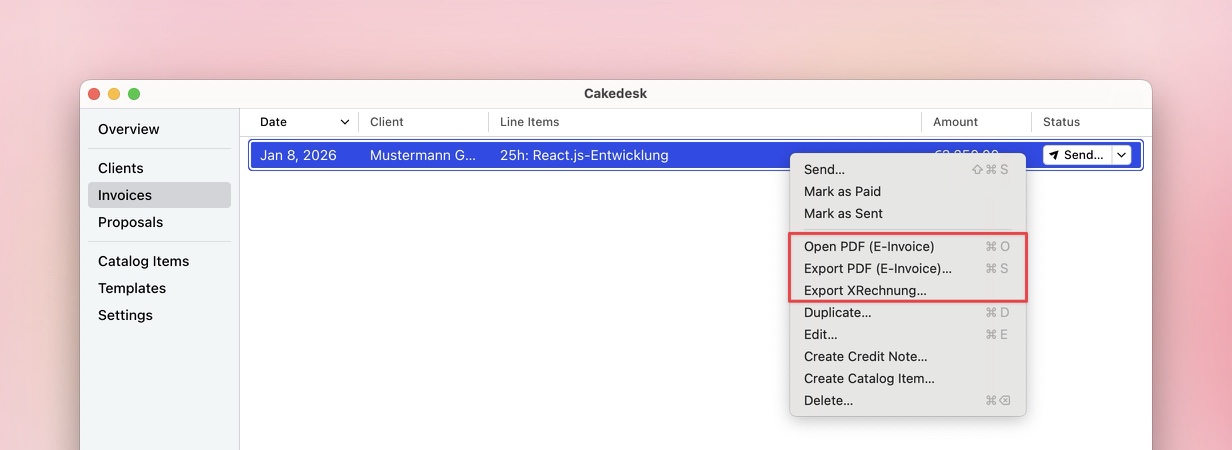
That's it. The exported XML file is your XRechnung. You can upload it to your client's portal or send it through the agreed channel.
#XRechnung example
An XRechnung is an XML file. The following example shows a complete, valid XRechnung with invoice number, line item, client and company data, totals, and tax information.
<?xml version='1.0' encoding='UTF-8'?>
<rsm:CrossIndustryInvoice
  xmlns:a="urn:un:unece:uncefact:data:standard:QualifiedDataType:100"
  xmlns:rsm="urn:un:unece:uncefact:data:standard:CrossIndustryInvoice:100"
  xmlns:qdt="urn:un:unece:uncefact:data:standard:QualifiedDataType:100"
  xmlns:ram="urn:un:unece:uncefact:data:standard:ReusableAggregateBusinessInformationEntity:100"
  xmlns:xs="http://www.w3.org/2001/XMLSchema"
  xmlns:udt="urn:un:unece:uncefact:data:standard:UnqualifiedDataType:100"
>
  <rsm:ExchangedDocumentContext>
      <ram:BusinessProcessSpecifiedDocumentContextParameter>
          <ram:ID>urn:fdc:peppol.eu:2017:poacc:billing:01:1.0</ram:ID>
      </ram:BusinessProcessSpecifiedDocumentContextParameter>
      <ram:GuidelineSpecifiedDocumentContextParameter>
          <ram:ID>urn:cen.eu:en16931:2017#compliant#urn:xeinkauf.de:kosit:xrechnung_3.0</ram:ID>
      </ram:GuidelineSpecifiedDocumentContextParameter>
  </rsm:ExchangedDocumentContext>
  <rsm:ExchangedDocument>
      <ram:ID>RN260617005</ram:ID>
      <ram:TypeCode>380</ram:TypeCode>
      <ram:IssueDateTime>
          <udt:DateTimeString format="102">20260617</udt:DateTimeString>
      </ram:IssueDateTime>
  </rsm:ExchangedDocument>
  <rsm:SupplyChainTradeTransaction>
      <ram:IncludedSupplyChainTradeLineItem>
          <ram:AssociatedDocumentLineDocument>
              <ram:LineID>1</ram:LineID>
          </ram:AssociatedDocumentLineDocument>
          <ram:SpecifiedTradeProduct>
              <ram:Name>Test</ram:Name>
          </ram:SpecifiedTradeProduct>
          <ram:SpecifiedLineTradeAgreement>
              <ram:NetPriceProductTradePrice>
                  <ram:ChargeAmount>1234.00</ram:ChargeAmount>
              </ram:NetPriceProductTradePrice>
          </ram:SpecifiedLineTradeAgreement>
          <ram:SpecifiedLineTradeDelivery>
              <ram:BilledQuantity unitCode="H87">1</ram:BilledQuantity>
          </ram:SpecifiedLineTradeDelivery>
          <ram:SpecifiedLineTradeSettlement>
              <ram:ApplicableTradeTax>
                  <ram:TypeCode>VAT</ram:TypeCode>
                  <ram:CategoryCode>S</ram:CategoryCode>
                  <ram:RateApplicablePercent>19.00</ram:RateApplicablePercent>
              </ram:ApplicableTradeTax>
              <ram:SpecifiedTradeSettlementLineMonetarySummation>
                  <ram:LineTotalAmount>1234.00</ram:LineTotalAmount>
              </ram:SpecifiedTradeSettlementLineMonetarySummation>
          </ram:SpecifiedLineTradeSettlement>
      </ram:IncludedSupplyChainTradeLineItem>
      <ram:ApplicableHeaderTradeAgreement>
          <ram:BuyerReference>001</ram:BuyerReference>
          <ram:SellerTradeParty>
              <ram:ID>DE12345</ram:ID>
              <ram:Name>Meine Firma</ram:Name>
              <ram:DefinedTradeContact>
                  <ram:PersonName>Maximilian Schmitt</ram:PersonName>
                  <ram:TelephoneUniversalCommunication>
                      <ram:CompleteNumber>+49160123456</ram:CompleteNumber>
                  </ram:TelephoneUniversalCommunication>
                  <ram:EmailURIUniversalCommunication>
                      <ram:URIID>meine.email@example.com</ram:URIID>
                  </ram:EmailURIUniversalCommunication>
              </ram:DefinedTradeContact>
              <ram:PostalTradeAddress>
                  <ram:PostcodeCode>10999</ram:PostcodeCode>
                  <ram:LineOne>Meine Straße 176</ram:LineOne>
                  <ram:CityName>Berlin</ram:CityName>
                  <ram:CountryID>DE</ram:CountryID>
              </ram:PostalTradeAddress>
              <ram:URIUniversalCommunication>
                  <ram:URIID schemeID="9930">DE12345</ram:URIID>
              </ram:URIUniversalCommunication>
              <ram:SpecifiedTaxRegistration>
                  <ram:ID schemeID="VA">DE12345</ram:ID>
              </ram:SpecifiedTaxRegistration>
          </ram:SellerTradeParty>
          <ram:BuyerTradeParty>
              <ram:Name>Beispielkunde</ram:Name>
              <ram:PostalTradeAddress>
                  <ram:PostcodeCode>10999</ram:PostcodeCode>
                  <ram:LineOne>Kundenstr. 176</ram:LineOne>
                  <ram:CityName>Berlin</ram:CityName>
                  <ram:CountryID>DE</ram:CountryID>
              </ram:PostalTradeAddress>
              <ram:URIUniversalCommunication>
                  <ram:URIID schemeID="9930">DE123456789</ram:URIID>
              </ram:URIUniversalCommunication>
              <ram:SpecifiedTaxRegistration>
                  <ram:ID schemeID="VA">DE123456789</ram:ID>
              </ram:SpecifiedTaxRegistration>
          </ram:BuyerTradeParty>
      </ram:ApplicableHeaderTradeAgreement>
      <ram:ApplicableHeaderTradeDelivery>
          <ram:ActualDeliverySupplyChainEvent>
              <ram:OccurrenceDateTime>
                  <udt:DateTimeString format="102">20260617</udt:DateTimeString>
              </ram:OccurrenceDateTime>
          </ram:ActualDeliverySupplyChainEvent>
      </ram:ApplicableHeaderTradeDelivery>
      <ram:ApplicableHeaderTradeSettlement>
          <ram:InvoiceCurrencyCode>EUR</ram:InvoiceCurrencyCode>
          <ram:SpecifiedTradeSettlementPaymentMeans>
              <ram:TypeCode>30</ram:TypeCode>
              <ram:PayeePartyCreditorFinancialAccount>
                  <ram:IBANID>DE02120300000000202051</ram:IBANID>
                  <ram:AccountName>Maximilian Schmitt</ram:AccountName>
              </ram:PayeePartyCreditorFinancialAccount>
              <ram:PayeeSpecifiedCreditorFinancialInstitution>
                  <ram:BICID>BYLADEM1001</ram:BICID>
              </ram:PayeeSpecifiedCreditorFinancialInstitution>
          </ram:SpecifiedTradeSettlementPaymentMeans>
          <ram:ApplicableTradeTax>
              <ram:CalculatedAmount>234.46</ram:CalculatedAmount>
              <ram:TypeCode>VAT</ram:TypeCode>
              <ram:BasisAmount>1234.00</ram:BasisAmount>
              <ram:CategoryCode>S</ram:CategoryCode>
              <ram:RateApplicablePercent>19</ram:RateApplicablePercent>
          </ram:ApplicableTradeTax>
          <ram:SpecifiedTradePaymentTerms>
              <ram:Description>
                  Bitte innerhalb von 7 Tagen nach Erhalt der Rechnung über eine der folgenden
                  Methoden bezahlen:

                  * IBAN: DE02120300000000202051
                  * PayPal: paypal@example.com
              </ram:Description>
              <ram:DueDateDateTime>
                  <udt:DateTimeString format="102">20260701</udt:DateTimeString>
              </ram:DueDateDateTime>
          </ram:SpecifiedTradePaymentTerms>
          <ram:SpecifiedTradeSettlementHeaderMonetarySummation>
              <ram:LineTotalAmount>1234.00</ram:LineTotalAmount>
              <ram:AllowanceTotalAmount>0.00</ram:AllowanceTotalAmount>
              <ram:TaxBasisTotalAmount>1234.00</ram:TaxBasisTotalAmount>
              <ram:TaxTotalAmount currencyID="EUR">234.46</ram:TaxTotalAmount>
              <ram:GrandTotalAmount>1468.46</ram:GrandTotalAmount>
              <ram:TotalPrepaidAmount>0</ram:TotalPrepaidAmount>
              <ram:DuePayableAmount>1468.46</ram:DuePayableAmount>
          </ram:SpecifiedTradeSettlementHeaderMonetarySummation>
      </ram:ApplicableHeaderTradeSettlement>
  </rsm:SupplyChainTradeTransaction>
</rsm:CrossIndustryInvoice>
#XRechnung or ZUGFeRD?
If you're unsure which e-invoice format your client expects, check out this comparison: XRechnung vs. ZUGFeRD.
#Validate XRechnung
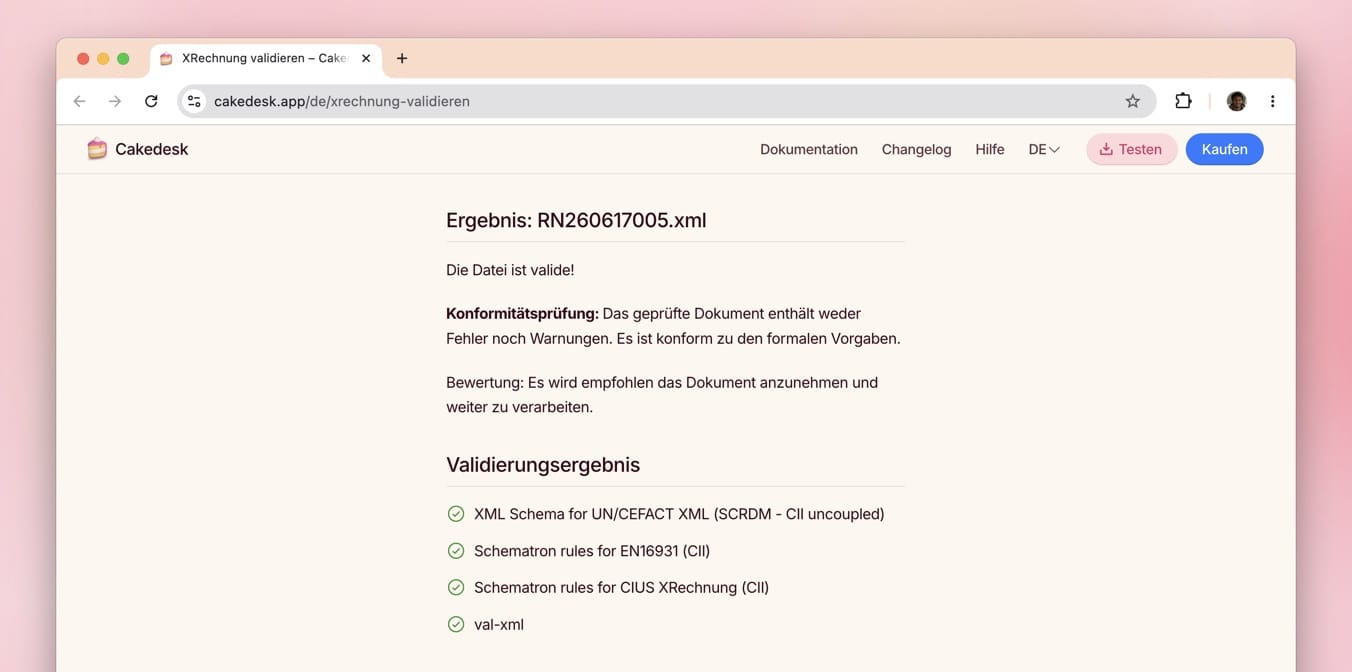
To make sure your XRechnung meets the formal requirements and all required fields are filled in correctly, you can use the Cakedesk validator: Validate XRechnung
Alternatively, you can validate and visualize XRechnung files at elster.de.
#Questions about XRechnung? Write to me
I'm Max, the developer of Cakedesk. If you have questions about creating XRechnung invoices or need help setting things up, feel free to contact me.